I bought Woolich software

Bike aesthetic/mechanical/electrical modifications and general wrenching advice.
User avatar
Champ87
Supercharged!

Supercharged!
Posts: 1289
Joined: Mon Apr 09, 2018 1:43 am
Location: NW Indiana US
Bike(s): Current bikes: 2018 H2 SX SE, '73 Yamaha RD350, '74 Kawasaki H1E, '74 Bultaco 250 Pursang
x 304
x 554

I bought Woolich software

Post by Champ87 » Fri May 11, 2018 3:44 am


This week I received the Woolich Racing Tuned software package I ordered for my H2 SX SE. For modern bikes I believe a scanner to read and clear codes is an essential tool for those of us who do our own maintenance. Instead of buying a scanner I preferred to put that $70 towards the WRT package that offers so much more.

Now that will seem like an odd purchase when I tell you that I have no intention of trying to tune my H2 SX SE myself. Numerous bike forums feature guessers who think they can add fuel here, add fuel there and claim improvements - without getting anywhere near a dyno! I am not one of those. Tuners like vcyclenut use a lot of experience combined with hours and hours of work to produce results that can be measured. When it comes to fuel and ignition mapping I’ll leave it to them. I intend to get my ECU flashed at some point or better still, maybe some dyno work to produce a custom map. I've had good success with custom mapping before.

One feature that does interest me is the ability to change ETV maps. We’ve read on this forum that our bikes have been restricted at the top end and altering the ETV maps can change that. There's a situation where results can be judged by rider feel. Get too aggressive though and the bike will feel edgy or vicious or just plain unrideable, If so, it’s easy enough to go back to the original setup and start again.

To use the WRT software the H2 SX requires a little bit of modification – the addition of one more pin to one of the ECU connectors. An extra harness then connects that pin and the Kawasaki diagnostics connector to the Woolich USB M v3 unit that connects to the software via a USB cable.

Tonight I started by installing that additional pin to the ECU connector. Unfortunately, getting access to the ECU requires removal of upper and lower fairings. Doing that for the first time was 1½ hour job so I ran out of time before I finished routing the wiring back to the tail unit. Finishing it off and connecting to my laptop will have to wait. I'll post more as I progress.

Fairings need to be removed to access the ECU
Image

WRT installation requires an extra pin added to one of the ECU connectors
Image
0 x

Champ87
It's amazing how fast you can go when you take your time.

User avatar
cOoTeR
Supercharged!

Supercharged!
Posts: 1105
Joined: Fri Dec 15, 2017 3:40 am
Location: United States
x 2

Re: I bought Woolich software

Post by cOoTeR » Fri May 11, 2018 10:49 am


Champ87 wrote: Fri May 11, 2018 3:44 am
One feature that does interest me is the ability to change ETV maps. We’ve read on this forum that our bikes have been restricted at the top end and altering the ETV maps can change that. There's a situation where results can be judged by rider feel. Get too aggressive though and the bike will feel edgy or vicious or just plain unrideable, If so, it’s easy enough to go back to the original setup and start again.
Just a heads up. When we opened the electronic throttle valves up more while tuning my bike on the dyno it went super rich before we started adjusting the timing and fueling.
0 x

Stock with airfilter 164whp 84ft.lbs
De-restricted + tuned 213whp 97ft.lbs
Full vandemon exhaust with tune 221whp 99ft.lbs
On Race Fuel 233whp 103ft.lbs

User avatar
vcyclenut
Supercharged!

Supercharged!
Posts: 1004
Joined: Mon Jan 22, 2018 4:44 pm
Location: Blaine, WA
x 28
x 60

Re: I bought Woolich software

Post by vcyclenut » Fri May 11, 2018 12:17 pm


awesome, your going to love it

if you have any questions feel free to reach out to me
0 x

User avatar
Champ87
Supercharged!

Supercharged!
Posts: 1289
Joined: Mon Apr 09, 2018 1:43 am
Location: NW Indiana US
Bike(s): Current bikes: 2018 H2 SX SE, '73 Yamaha RD350, '74 Kawasaki H1E, '74 Bultaco 250 Pursang
x 304
x 554

Re: I bought Woolich software

Post by Champ87 » Fri May 11, 2018 2:47 pm


vcyclenut wrote: Fri May 11, 2018 12:17 pmif you have any questions feel free to reach out to me
Thanks, I will most likely follow-up on that kind offer. I intend to buy an ECU flash from you at some point. Right now I don't want any down time while sending off the ECU so that will have to wait until later in the year when weather isn't good for riding. Besides, I haven't even completed break-in so talk of ECU flash and ETV mapping is all a bit premature.
0 x

Champ87
It's amazing how fast you can go when you take your time.

User avatar
Champ87
Supercharged!

Supercharged!
Posts: 1289
Joined: Mon Apr 09, 2018 1:43 am
Location: NW Indiana US
Bike(s): Current bikes: 2018 H2 SX SE, '73 Yamaha RD350, '74 Kawasaki H1E, '74 Bultaco 250 Pursang
x 304
x 554

Re: I bought Woolich software

Post by Champ87 » Fri May 11, 2018 3:27 pm


cOoTeR wrote: Fri May 11, 2018 10:49 amJust a heads up. When we opened the electronic throttle valves up more while tuning my bike on the dyno it went super rich before we started adjusting the timing and fueling.
Yes, I saw that in your finally taking my bike in for a flash and tune thread. In the past manufacturers would often richen it at the very top end as a safety measure. The lower A/F (richer) provides more cooling inside the cylinder as a protection against detonation. I would guess there is less need on modern bikes. The way they are mapped it is possible to pull timing out of specific areas to reduce the chance of detonation without affecting the whole rpm range. Bikes like the H2 SX have a further level of protection using knock sensors.

That's the theory of it but the reality is that I have no way to know how much fuel or timing to remove. Sure, I know it's too rich (thanks to your post) and maybe needs a little less timing advance but, without easy access to a dyno, any changes I make would be guesswork. That's why, even with the software, it makes sense for me to buy a flash as a first step.

Sometimes forums can get a bit wild but I'm really enjoying the information sharing that's going on here. The H2 SX is new to all of us and it seems we're all keen to learn more.
0 x

Champ87
It's amazing how fast you can go when you take your time.

User avatar
ghostwriter78
Accelerating

Accelerating
Posts: 132
Joined: Mon Feb 12, 2018 8:16 am
Location: Chiang Mai / Thailand
x 1

Re: I bought Woolich software

Post by ghostwriter78 » Mon May 14, 2018 1:33 am


vcyclenut wrote: Fri May 11, 2018 12:17 pm awesome, your going to love it

if you have any questions feel free to reach out to me
There is no way to connect the kit just to the harness under pillion seat?
0 x

Current: H2 SX SE 2018, FZ6 2010, CB1 :D
Sold: R6 2008, 2x CBR650F ('14/'17), CBR500R, CBR250R

User avatar
WR-NA
Accelerating

Accelerating
Posts: 104
Joined: Thu Mar 15, 2018 11:09 pm
Bike(s): 2009 ZX6R (Race), 2011 ZX10R, 2016 ZX10R, 2017 Z125 Pro, 2018 Ninja 400 (Race), 2019 H2, 2020 Z H2
x 2

Re: I bought Woolich software

Post by WR-NA » Mon May 14, 2018 5:31 am


ghostwriter78 wrote: Mon May 14, 2018 1:33 am
vcyclenut wrote: Fri May 11, 2018 12:17 pm awesome, your going to love it

if you have any questions feel free to reach out to me
There is no way to connect the kit just to the harness under pillion seat?
Blame Kawasaki, they are the ones who wired the bike, not Woolich. They have to work with what the manufacturer puts out. And to write the ECU, you need to install a wire at one of the ECU connectors, run it towards the tail, where it then mates up with the other half of the harness that connects in the rear. One time inconvenience - after that you can read/write/log/diagnostics easily from accessing the pillion/seat.
0 x

User avatar
Champ87
Supercharged!

Supercharged!
Posts: 1289
Joined: Mon Apr 09, 2018 1:43 am
Location: NW Indiana US
Bike(s): Current bikes: 2018 H2 SX SE, '73 Yamaha RD350, '74 Kawasaki H1E, '74 Bultaco 250 Pursang
x 304
x 554

Re: I bought Woolich software

Post by Champ87 » Fri May 18, 2018 1:09 am


Part 2 of the story:

I finally got some free time to finish off my Woolich harness installation. Everything’s good, I connected the USB interface to the bike, read the ECU and saved the file as a reference point. I’m happy now but I did experience a few issues along the way.

First issue was lack of install instructions for the single wire extension harness. When you purchase the WRT package it allows you to create an account to gain access to the software, Bin file definitions and install guides. A number of guides were listed – but not the one I needed. I submitted a support ticket. Response was almost instant – I received an email with a link to download instructions.

Installation instructions were for a Type 13 harness for the H2 – apart from fairing removal it’s an identical install. Instructions are detailed with nice clear pictures. I’m quite familiar with wiring mods and adding terminals to multi-pin connectors so it all seemed quite straightforward.

Had another small irritation when it came to connect everything. The instructions say “Plug the Kawasaki Harness Type 13 into the matching KDS plug”. Under the passenger seat of the H2 SX there are two identical looking plugs. One is the KDS connector, the other is for ABS diagnostics. I had to look at the wiring diagram in the service manual to determine which was the correct plug to connect to. Without a service manual I would’ve been stuck. Hopefully, Woolich will correct that oversight when they produce instructions for the H2 SX – hint.

Image
0 x

Champ87
It's amazing how fast you can go when you take your time.

User avatar
Champ87
Supercharged!

Supercharged!
Posts: 1289
Joined: Mon Apr 09, 2018 1:43 am
Location: NW Indiana US
Bike(s): Current bikes: 2018 H2 SX SE, '73 Yamaha RD350, '74 Kawasaki H1E, '74 Bultaco 250 Pursang
x 304
x 554

Re: I bought Woolich software

Post by Champ87 » Fri May 18, 2018 1:11 am


The single wire extension harness is then connected to the bike harness which, is now connected to the little black box – the Woolich USB M v3 interface. After connecting to my laptop with the supplied USB cable I was good to go – or so I thought!

When I opened up the WRT software a message came up telling me that I needed to upgrade the firmware. Hmm. I wanna play with my new gadgets; I don’t expect to be upgrading firmware on something I just bought. Alright, show a little bit of patience Champ. I followed the upgrade instructions. Upgrade finished. The software tells me again that I need to upgrade. What? I followed the instructions. The third time the message came up I decided that joke wasn’t funny anymore. Step back, calm down and try again. I disconnected everything and removed the windows USB drivers. I reconnected, allowed Windows to reinstall drivers and repeated the process. This time no message about upgrading firmware.

With USB drivers installed on laptop, selector switch to right hand position, ignition on, kill switch in run position, Bin file definition opened and…..here we go….tell software to read ECU. I waited for the ECU read to start but it didn’t. An error message came up – “Failed to Initialize Communications with ECU - No Initial Response”. Tried a couple of times and started getting worried that maybe I hadn’t installed the additional pin on the ECU connector properly. To check again was going to involve fairing removal (again) so, before facing that task, I ran through the recommended check procedures for the USB interface. Tests all passed. What next? One more try in desperation. This time SUCCESS! I don’t know why. The only thing I did different was to use the menu option “Tools>Read ECU” instead of the “Read ECU” button. Can’t see why that should make any difference but it doesn’t matter right now; my ECU data has been read and saved. Read data should be the same as the Bin file definitions provided by Woolich but there is a ton of hidden data that cannot be accessed by the software so best to save the actual information from my bike.

Image
Last edited by Champ87 on Fri May 18, 2018 2:14 am, edited 3 times in total.
0 x

Champ87
It's amazing how fast you can go when you take your time.

User avatar
Champ87
Supercharged!

Supercharged!
Posts: 1289
Joined: Mon Apr 09, 2018 1:43 am
Location: NW Indiana US
Bike(s): Current bikes: 2018 H2 SX SE, '73 Yamaha RD350, '74 Kawasaki H1E, '74 Bultaco 250 Pursang
x 304
x 554

Re: I bought Woolich software

Post by Champ87 » Fri May 18, 2018 1:12 am


All that might sound like a major drama. It did send me into grumpy mode for a while but I’ll put it into perspective by saying that the whole series of failures, retrys and eventual success was maybe an hour in total. I’m happy with the Woolich package and sharing my experiences so others know what they could experience – but hopefully won’t.

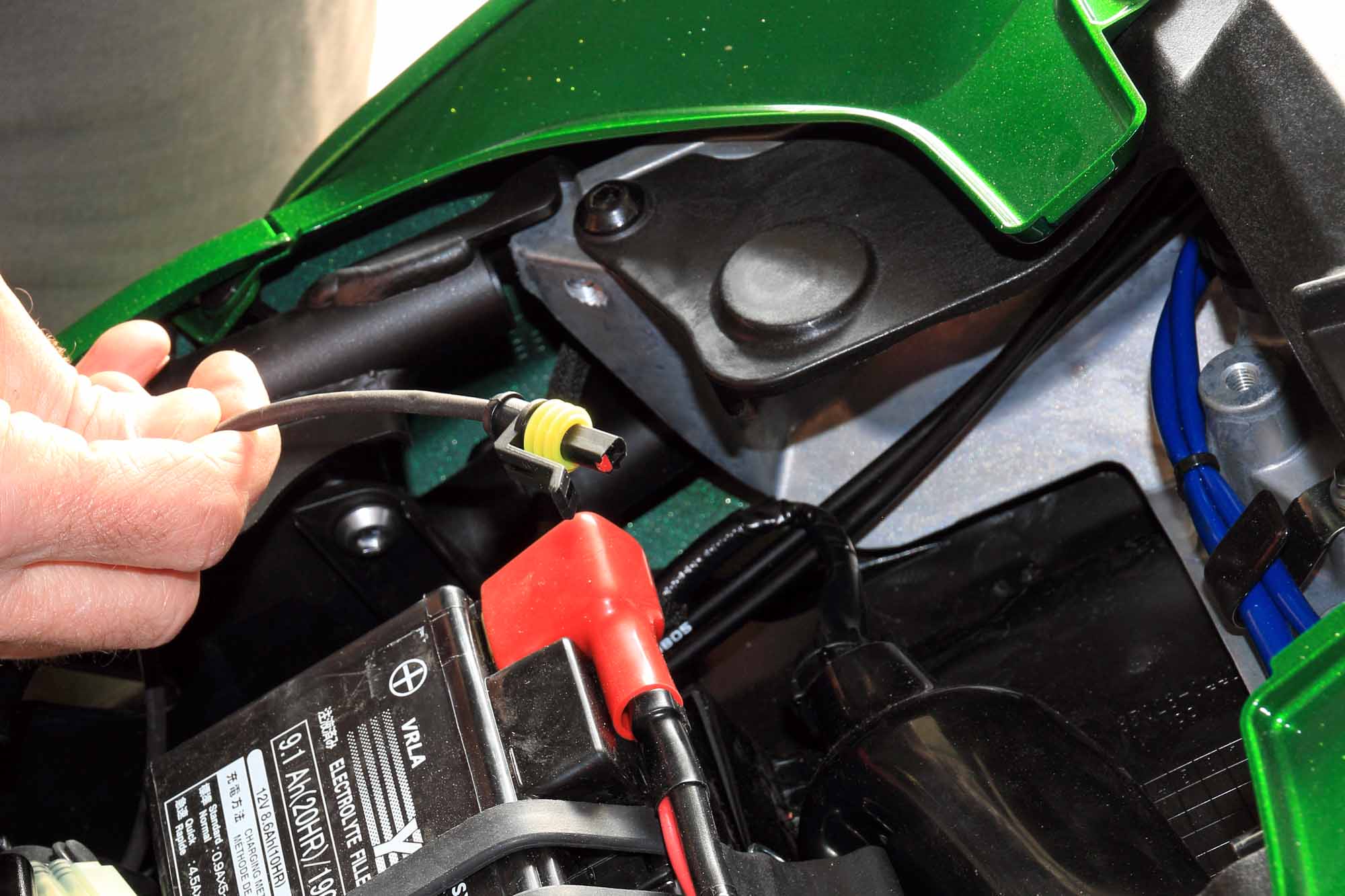
When not being used the Woolich USB M v3 interface and bike harness can be removed leaving only the single wire extension in place. It would be nice if that single wire extension was maybe 15 cm (6”) longer then it would reach to where the diagnostic connector is located under the passenger seat – avoiding the need to remove both seats. As it is, the connector and wire sit nicely out of sight in the battery compartment. That single wire harness is what allows reading from and writing to the ECU. If I take my bike in for some dyno work then it’s already there for the tuner to use – if they’re using Woolich software.

Image
Last edited by Champ87 on Fri May 18, 2018 2:05 am, edited 1 time in total.
0 x

Champ87
It's amazing how fast you can go when you take your time.

Post Reply

Who is online

Users browsing this forum: Google [Bot] and 19 guests